How to Reset AirPods: Restart vs Factory Reset
How to reset AirPods and AirPods Pro, or just restart them: case button or double-tap steps for every model, AirPods Max, a lost case, and reconnecting.
 Nilesh Sharma· · Updated · 13 min read
On this page
When one earbud goes silent, the case won't charge, or your iPhone can't find your AirPods, you have two fixes: a quick restart and a full factory reset. A restart takes 30 seconds and changes nothing. A reset clears the pairing and your settings, and returns the AirPods to how they shipped.
Quick answer: to restart AirPods, put both earbuds in the case, close the lid for about 30 seconds, then open it. To factory reset AirPods, forget them in Settings > Bluetooth, open the lid, and:
- AirPods 1, 2, 3 and AirPods Pro 1 or 2: press and hold the setup button on the back of the case for about 15 seconds.
- AirPods 4, AirPods 5 and AirPods Pro 3 (no button): double-tap the front of the case while the light is on, again when it flashes white, and a third time when it flashes faster.
- AirPods Max: hold the listening mode button and the Digital Crown for about 15 seconds.
The reset is done when the status light flashes amber, then white. Every step below follows Apple's own support article, How to reset your AirPods and AirPods Pro, checked on November 7, 2026.
Restart vs factory reset: which do you need?
AirPods and AirPods Pro have no power button. You can't switch them off and on like a phone, so "restarting" them means letting the case power them down and wake them up again. Try that first, because a factory reset erases your custom settings and you'll have to pair again.
| Item | Restart | Factory reset |
|---|---|---|
| What it does | Powers the earbuds down and back up | Erases pairing and settings, back to factory state |
| How (AirPods / AirPods Pro) | Put both in the case, close the lid 30 seconds, open it | Case button for 15 seconds, or three double-taps on the front |
| How (AirPods Max) | Hold listening mode button + Digital Crown until the light flashes amber, then let go | Keep holding both for about 15 seconds, until amber then white |
| Keeps your settings? | Yes | No, you set them up again |
| Need to pair again? | No | Yes, on every device |
| Removes Find My / Apple Account link? | No | No, the owner must remove it in Find My |
| Use it when | Glitchy sound, one-off connection drop, mic not working | Restart didn't help, won't charge, won't pair, giving them away |
How to restart AirPods
- Put both AirPods in the charging case.
- Close the lid. Apple's AirPods user guide says at least 10 seconds; its reset article uses 30 seconds, so 30 is a safe number.
- Open the lid near your iPhone, wait for them to reconnect, and test the audio.
That's the full restart for every AirPods and AirPods Pro model. If the problem is your phone rather than the earbuds, restarting the iPhone too often clears Bluetooth glitches. See how to turn off an iPhone, or how to hard reset an iPhone if it's frozen.
Restart AirPods Max: press and hold the listening mode button and the Digital Crown together until the status light flashes amber (around 10 seconds), then let go straight away. Keep holding and they factory reset instead. Apple covers both in How to restart or reset AirPods Max.
Which reset method do your AirPods use?
| Model | Reset method | How long |
|---|---|---|
| AirPods 1, 2 and 3 | Hold the setup button on the back of the case | About 15 seconds |
| AirPods Pro 1 and AirPods Pro 2 | Hold the setup button on the back of the case | About 15 seconds |
| AirPods 4 (all models) and AirPods 5 (both models) | Double-tap the front of the case three times | Follow the light |
| AirPods Pro 3 | Double-tap the front of the case three times | Follow the light |
| AirPods Max (all models, including AirPods Max 2) | Hold the listening mode button + Digital Crown | About 15 seconds |
Not sure which AirPods you have? Go to Settings > Bluetooth, tap the More Info button next to your AirPods and check the Model Number. It's also printed on the underside of each earbud, or behind the left cushion on AirPods Max. Match it on Apple's Identify your AirPods page. For example, AirPods Pro 3 are A3063, A3064 or A3065, AirPods 4 are A3050, A3053 or A3054, and AirPods Pro 2 (USB-C) are A3047, A3048 or A3049.
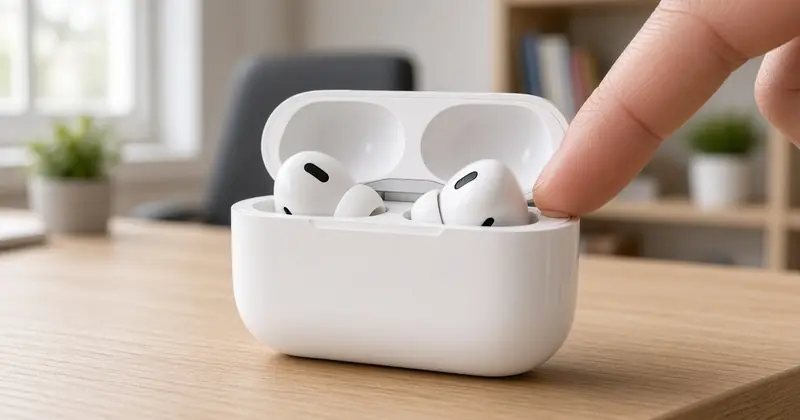
A quick way to tell without your phone: if there's a small round button on the back of the case, use the button method. If the back is smooth, use the double-tap method.
How to reset AirPods Pro 1, Pro 2 and AirPods 1, 2, 3 (setup button)
- Put your AirPods in the charging case, close the lid, and wait 30 seconds.
- On your paired iPhone or iPad, go to Settings > Bluetooth. If your AirPods appear under My Devices, tap the More Info button next to them, tap Forget This Device, then confirm. If they aren't listed, skip this step.
- Open the lid.
- Press and hold the setup button on the back of the case for about 15 seconds.
- When the status light on the front of the case flashes amber, then white, the reset is done. Follow the steps on your device's screen to reconnect.
On the original Lightning charging case for AirPods 1 and 2, the status light sits inside the case between the earbuds, so look there instead of on the front.
How to reset AirPods Pro 3, AirPods 4 and AirPods 5 (no button)
These cases have no setup button. Instead, the front of the case responds to taps. This covers all AirPods 4 models (with or without Active Noise Cancellation), both AirPods 5 models and AirPods Pro 3.
- Put your AirPods in the charging case, close the lid, and wait 30 seconds.
- On your paired iPhone or iPad, go to Settings > Bluetooth, tap the More Info button next to your AirPods, tap Forget This Device and confirm. Skip this if they aren't listed.
- Open the lid.
- Double-tap the front of the case while the status light is on.
- Double-tap again when the status light flashes white.
- Double-tap a third time when the status light flashes faster.
- When the light flashes amber, then white, the reset is done.
Tap firmly with one finger in the middle of the front of the case, near the status light, and wait for the light to change before each double-tap. If you tap too early, close the lid and start again.
How to reset AirPods Max
AirPods Max have no case button, so you reset them with the controls on the right ear cup. The steps are the same for every AirPods Max model, including the USB-C version and AirPods Max 2.
- Charge them to at least 50 percent first (Apple recommends this before a restart or reset).
- Press and hold the listening mode button (formerly called the noise control button) and the Digital Crown at the same time.
- Keep holding for about 15 seconds, until the status light flashes amber, then white.
- Release both buttons, then connect them to your device again.
How to reset AirPods without the case (or if you lost it)
For AirPods and AirPods Pro, you can't. Every factory reset method Apple documents runs through the charging case, either the setup button or the double-tap. Tapping Forget This Device on your iPhone only unpairs them from your devices. It doesn't reset the earbuds themselves.
If you've lost the case or an earbud:
- Look for it with Find My. Open the Find My app, tap Devices and choose your AirPods to see them on a map or play a sound. Apple's Find your lost AirPods explains Find Nearby and Lost Mode.
- Buy a replacement case or earbud through Apple Support if it's really gone.
- Set up the replacement. Put both AirPods in the new case, connect it to power, close the lid for 20 minutes, then follow Apple's Set up your replacement AirPods or charging case steps, which include the same button or double-tap reset.
AirPods Max are the exception: they reset with their own buttons and don't need a case.
You don't need a phone to reset AirPods. Forgetting them in Bluetooth settings is an optional first step, and Apple's steps say to skip it if they aren't listed. The reset itself happens on the case, so you can do it anywhere and pair them to any device afterwards.
Find My: resetting doesn't remove the owner's Apple Account
A factory reset clears the Bluetooth pairing, but it doesn't remove the link between the AirPods and their owner's Apple Account in Find My. This matters if you bought used AirPods or you're selling yours. Apple says in If an item or device is connected to another Apple Account that it can't remove that link for you.
To remove AirPods from an Apple Account (the owner does this):
- Open the Find My app on iPhone or iPad and tap Devices.
- Tap the AirPods, then tap Remove This Device and confirm.
- No iPhone handy? Sign in at icloud.com/find, select the AirPods and choose Remove This Device.
The AirPods don't need to be nearby. Once they're removed, reset them and set them up as new. Selling your own pair? Remove them from Find My first so the buyer doesn't hit this problem. The same idea applies to phones, see how to turn off Find My iPhone before you sell or trade in an iPhone.
How to reconnect AirPods after a reset
iPhone or iPad: go to the Home Screen. Keep the AirPods in their case, open the lid, and hold the case next to your device. A setup animation appears. Tap Connect, follow the prompts, then tap Done. If you're signed in to iCloud, they're set up on your other devices with the same Apple Account too. No animation? Go to Settings > Bluetooth, put the AirPods in pairing mode (hold the setup button, or double-tap the front of the case on AirPods 4, AirPods 5 and AirPods Pro 3, until the light flashes white) and select them. Apple's Connect your AirPods to your iPhone has the full steps.
Mac: if your Mac uses the same Apple Account as your iPhone, the AirPods may connect automatically: click Control Center in the menu bar, click Sound and choose them. Otherwise open System Settings > Bluetooth, put the AirPods in their case, open the lid and put them in pairing mode until the light flashes white. For AirPods Max, hold the listening mode button for about 5 seconds. Then click Connect next to them. See Apple's Set up AirPods with your Mac and other Bluetooth devices.
Android, Windows or other devices: AirPods work as a standard Bluetooth headset. Turn on Bluetooth (on many Android phones: Settings > Connections > Bluetooth, or Pair new device), open the AirPods case and put them in pairing mode until the light flashes white, then select them from the list. You can listen and talk, but Siri and Apple-only features such as automatic switching aren't available.
AirPods troubleshooting table: lights, one AirPod, won't reset
| What you see | What it means | What to do |
|---|---|---|
| Green light | Fully charged | Nothing, you're good |
| Amber light (or slow amber pulse on newer models) | Less than a full charge left (newer models pulse amber under 95%) | Charge the case and earbuds |
| Quick amber flash once on open (newer models) | AirPods under 95% and case under 25% | Charge the case soon |
| Flashing white | Ready to pair | Pick them on your device, or tap Connect |
| Amber, then white during a reset | Reset worked | Reconnect them |
| No light at all | Case or earbuds are flat | Charge for a while, then try again |
| Light never flashes white when resetting | Reset didn't start | Close the lid for 20 seconds, open it, repeat the button hold or the three double-taps |
| Only one AirPod plays sound | Earbud not charging or not connected | Clean the case contacts, charge both 30 seconds, test it alone, check Balance, then reset |
| One AirPod quieter than the other | Debris in the mesh or Balance set off-centre | Clean the mesh, then Settings > Accessibility > Audio & Visual > Balance to the middle |
| Can't add them to your account | Still linked to someone else's Apple Account | Previous owner must use Remove This Device in Find My |
The status light meanings come from Apple's Charge your AirPods page, and the one-earbud steps from If your left or right AirPod isn't working. A few more checks if they still misbehave:
- Update your device. Install the latest iOS, iPadOS or macOS. AirPods firmware updates automatically while they're charging and in Bluetooth range of an iPhone, iPad or Mac on Wi-Fi.
- Check the audio output. If sound comes from another speaker, pick your AirPods in Control Center (on a Mac: Control Center > Sound).
- Clean gently. Use a soft, dry, lint-free cloth and don't put liquid into the charging ports.
- Contact Apple. If nothing works, it may be a hardware fault, so reach out to Apple Support or an authorized service provider.
Wiping a phone at the same time? Our guide on how to factory reset an iPhone explains why you should unpair accessories first. You'll find more fixes on the blog.
FAQ
How do I restart my AirPods?
Put both AirPods in the charging case, close the lid for about 30 seconds (Apple says at least 10), then open it near your iPhone. There's no power button, so this is the restart. For AirPods Max, hold the listening mode button and Digital Crown until the light flashes amber, then let go.
How do I reset my AirPods?
Forget them in Settings > Bluetooth, open the case lid, then hold the setup button on the back for about 15 seconds (AirPods 1 to 3, AirPods Pro 1 and 2), or double-tap the front of the case three times as the light changes (AirPods 4, AirPods 5, AirPods Pro 3). It's done when the light flashes amber, then white.
How do I reset AirPods Pro 2?
Put them in the case and close the lid for 30 seconds, forget them in Bluetooth settings, open the lid, then press and hold the setup button on the back of the case for about 15 seconds until the status light flashes amber, then white.
How do I reset AirPods Pro 3?
Open the lid and double-tap the front of the case: once while the light is on, again when it flashes white, and a third time when it flashes faster. It's done when the light flashes amber, then white. AirPods Pro 3 have no setup button.
How do I reset AirPods 4 without a button?
AirPods 4 use the same double-tap method as AirPods Pro 3: double-tap the front of the open case while the light is on, again when it flashes white, and a third time when it flashes faster.
What's the difference between restarting and resetting AirPods?
A restart just powers them down and up, and keeps your pairing and settings. A factory reset erases the pairing and custom settings, so you have to connect them again on every device.
Does resetting AirPods delete anything?
It removes the pairing and your custom settings, like press or double-tap actions. It doesn't touch music or data on your phone, and it doesn't remove them from the owner's Find My.
Can I reset AirPods without the case?
No, not AirPods or AirPods Pro. Every reset runs through the charging case. If the case is lost, get a replacement case from Apple and reset through it. AirPods Max reset with their own buttons.
Can I reset just one AirPod?
No. Apple's reset steps reset both earbuds and the case together, so put both AirPods in the case first. If only one earbud has a problem, clean it, charge both and reset the pair.
Why won't my AirPods flash white when I reset them?
Close the lid for 20 seconds, open it and try again, making sure the case has some charge. On button-less cases, wait for each light change before you double-tap.
Can I reset AirPods someone else owned?
Yes, you can factory reset them, but that doesn't remove them from the previous owner's Apple Account. They must use Remove This Device in the Find My app or at icloud.com/find before you can set them up on your account.
How do I connect AirPods to Android after a reset?
Turn on Bluetooth on the Android phone, open the AirPods case, hold the setup button (or double-tap the front on AirPods 4, AirPods 5 and AirPods Pro 3) until the light flashes white, then pick them from the Bluetooth list.
- #how to reset airpods
- #how to restart airpods
- #how to restart your airpods
- #how to reset airpods pro
- #how to reset airpods pro 2
- #how to reset airpods pro 3
- #how to reset airpods 4
- #how to reset airpods max
- #factory reset airpods
- #reset airpods without case
- #reset airpods without button
- #reset airpods from previous owner
- #airpods status light
- #one airpod not working
- #airpods
- #troubleshooting
- #bluetooth